
The Papyrological Editor (PE, SoSOL), Ryan Baumann et al. (ed.), 2010. https://papyri.info/editor/ (Last Accessed: 14.08.2024). Reviewed by  Lavinia Ferretti (Universität Basel), lavinia.ferretti@unibas.ch and Elisa Nury (Université de Genève), elisa.nury@unige.ch. ||
Abstract:
The Papyrological Editor is the editing environment of Papyri.info. It allows users to collectively curate data while keeping high scientific standards through a peer-review system and a Git-based version history. A custom syntax called Leiden+ makes the edition of XML data more easily accessible to users. However, the complexity of the multiple interlinked databases and the technical expertise needed to work with papyri may be a barrier for new users. The review focuses particularly on the user perspective, analyzing what makes the Papyrological Editor successful and how it could be improved.
Introduction
1The Papyrological Editor (PE) is one of the two core components of Papyri.info, the platform for accessing a large collection of ancient Greek documentary and literary texts on papyri and ostraca (potsherds). The PE describes itself as an editing environment, enabling scholarly curation of the material from Papyri.info with version control and peer review mechanisms; it is accessible to everyone through registration. Its counterpart, the Papyrological Navigator (PN), is the openly accessible interface that allows for searching and viewing of the texts and their associated metadata. Lucia Vannini (2018) previously reviewed the PN component of Papyri.info for RIDE and received an award for best review. This review’s purpose is not to duplicate Lucia Vannini’s work but to complement it with a review of the second component of Papyri.info, the Papyrological Editor; we will thus focus on the crowd editing aspect enabled by the PE.
2We begin with introductory remarks on the Papyrological Editor’s history, authors, audience and aims. Afterwards, the body of the review is divided into two parts. The technical infrastructure is first described with a particular focus on two aspects that are tightly related: the Leiden+ syntax and the transcription interface. Leiden+ is a user-friendly, low-code syntax specifically developed for the PE and plays a central role in editing the transcriptions of papyri. The second part covers the various steps of the crowd-editing and peer-review processes from a user perspective. While we mention minor bugs, we have not tried the platform across different browsers and OS,1 and so do not aim at universality on this point. We rely on our experience of the platform combined with discussions with our colleagues.2 We finally discuss the questions of rights and attribution of scholarly contributions to Papyri.info. Users interested in the process of integrating textual corrections to the database can also consult the review of this aspect of the PE by Despina Borcea (2022).
History
3The history of Papyri.info is described in a variety of publications (Sosin 2010; Babeu 2011; Baumann et al. 2011; Baumann 2013; Reggiani 2017; Cayless 2019). This platform is the result of three Mellon Foundation-funded projects titled Integrating Digital Papyrology (IDP) which ran from 2008 to 2012. In 2010, both components of Papyri.info (PN and PE) were formally launched during the 26th Congress of the International Association of Papyrologists (Sosin 2010).3
4The IDP projects aimed to gather multiple databases with overlapping papyrological content and make them accessible and editable through one common online platform. The first databases integrated into Papyri.info were the Duke Databank of Documentary Papyri (DDbDP), a textual collection of edited documentary papyri encoded in TEI; the Heidelberger Gesamtverzeichnis (HGV), an XML collection of metadata pertaining to documentary papyri combined with a further database of XML translations into modern languages; the Advanced Papyrological Information System (APIS), a metadata repository for papyri collections primarily located in America. These were completed by the addition of the Digital Corpus of Literary Papyri (DCLP), collecting TEI-encoded text and metadata concerning literary and paraliterary papyri, and a bibliographical database building on a copy of the Bibliographie Papyrologique (BP).4 In addition, Papyri.info also displays data from Trismegistos, another database collecting metadata on texts from the ancient world, although the latter cannot be edited through the PE.5 The Trismegistos numbers attributed to papyri (Depauw and Gheldof 2014) serve as stable identifiers to crosslink the databases.
5The model behind the conception of the PE is Suda On-Line (SOL), a project to crowd-source the translation to English of a 10th-century Byzantine encyclopedia called the Suda, pioneering in combining data openness with editorial vetting. The editing environment was therefore named Son of Suda On-Line (SoSOL). The PE is an instance of SoSOL (Baumann 2013, 104), and SoSOL is the ‘bundle of services’ conceived as a reusable environment. The reusability of SoSOL was demonstrated in the Digital Corpus of Literary Papyri, a project that terminated in the late 2010s and is now integrated into the Papyri.info environment.6
Author(s)
7Although the conceptual inspiration of SoSOL is clear, correct authorship attribution of the PE is not as straightforward. We have chosen to highlight Ryan Baumann, the main contributor of the SoSOL code in the GitHub repository and author of the peer-reviewed article describing SoSOL and its functionalities (Baumann 2013). He was not working alone, but it is less obvious who to credit as co-creators of SoSOL among the various collaborators of the IDP. The proposal for the IDP2 project mentions the University of Kentucky’s Center for Visualization and Virtual Environments (VisCenter) as the group responsible for SoSOL. The About page of the DDbDP gives the names of Charles Carpenter and John Fox as members of the VisCenter. The Digital Classicist Wiki entry for the PE lists Hugh Cayless as a co-author to Ryan Baumann. However, it is likely safe to assume that most scholars involved in IDP2 may have contributed more or less to the creation of SoSOL, whether from a technical or conceptual perspective.
Editorial Tasks
8The creation of the PE was motivated by the need to maintain and keep up to date the databases gathered in Papyri.info, particularly the Duke Databank of Documentary Papyri, which lacked financial resources (Sosin 2010; Cayless 2019). Moreover, it aimed to democratize the management of a dataset that ultimately belongs to the community. The crowd is therefore involved in helping to maintain the material on Papyri.info and keeping it up-to-date with the scientific consensus.
9The editorial tasks carried out vary in scope: correcting existing transcriptions and metadata, adding new material retrieved from academic publications, or directly publishing new scholarship. In the first case, the corrections may be relatively small, such as adding missing words to the transcription or updating the link to an online facsimile. Adding new material from academic publications includes incorporating a new conjecture from an article or creating new XML transcription files for newly edited papyri published in a volume or article. New scholarship in Papyri.info mainly takes the form of corrections to existing transcriptions, except that these corrections have not been published elsewhere.7 In the past, some experiences with native digital editions have also been made (Berkes 2018), but this practice is rare and will not be the subject of this review.8 All three forms of editorial tasks undergo peer review from a board of editors before being integrated.
Users of the PE
10Although anyone can register to the PE, knowledge of Greek papyrology and either the EpiDoc standard in XML or the Leiden+ syntax (see below) are necessary to contribute to Papyri.info. The full list of PE users is available.9 There are 5,259 registered users as of June 21, 2024. However, this list contains roughly 1,200 suspected spam users whose names are composed of random letters, and many duplicates. Through the Git repository, we gain a better view. There have been a thousand active users since the inception of Papyri.info, and the 100 most active are responsible for over 97 % of the modifications. Again, there are duplicates in this list since scholars may have contributed from different accounts created at different times.10 In fact, the number of active users is rather small compared to the amount of work required to keep it truly up-to-date. New volumes of edited papyri are published each year.11 Moreover, additional corrections and editions regularly appear in journal articles. There can also be errors in the data due to the conversion to EpiDoc XML from the original DDbDP and HGV databases, and their correction also relies on the community of PE users.
SoSOL Infrastructure
11Before addressing the PE user experience, we wish to explain and comment on the technical aspects of the platform. The infrastructure of SoSOL is found open source on GitHub, with a GPL-3.0 License. SoSOL is a custom platform developed for the Integrating Digital Papyrology projects. It uses JRuby with the Rails web framework. Contrary to other online editing environments, such as MediaWiki, it does not rely on a SQL database but on Git, a tool meant for source code management and tracking versions of files.
12The argument for Git was its decentralized workflow possibilities, especially branching and merging. Git facilitates the editorial process where users and board members may work in parallel on the same publication and preserves the version history. There are two repositories for the data: the PE has its own GitHub repository, which is regularly updated via the user interface, and the idp.data is the public-facing repository. Both are “synchronized bidirectionnally on an hourly basis”.12 The idp.data repository hosts the data of all the databases integrated into Papyri.info. The HGV data is synchronized back to HGV, the only database still maintained separately. Advanced users may change the data directly in the idp.data repository, but using the PE is recommended as it incorporates the peer-review process.
Leiden+ and EpiDoc Syntax
13Using Git is not the only innovation of the PE. The transcription interface for XML editing, based on the Leiden+ syntax developed expressly for the SoSOL, impacts users even more directly.
14The Leiden+ is inspired by the Leiden conventions for editing ancient texts. Its developers aimed to offer a user-friendly alternative to XML editing for PE users, encourage participation in the crowdsourcing effort with an easier-to-learn system, and, therefore, bridge the gap between traditional and digital papyrology.
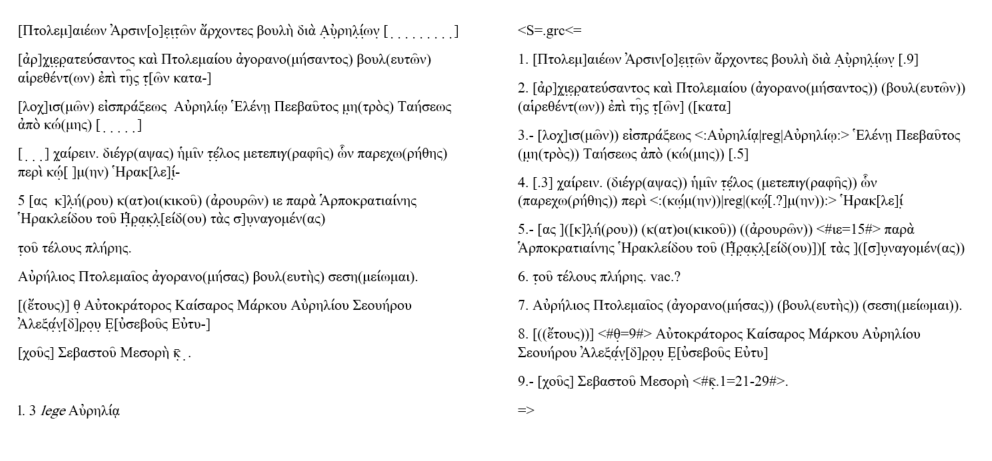
16Nicola Reggiani (2017, 232–40) presents a more in-depth discussion of the main differences between Leiden+ and its XML equivalent: the Leiden Conventions and Leiden+ system consist of a descriptive syntax, while the XML markup is semantic. For example, a lacuna is always indicated with square brackets in Leiden systems, whereas in EpiDoc, it may be rendered with either <gap> or <supplied> element, depending on whether the editor attempted to render the text of the lacuna or not. Consequently, semantic errors are not detected in Leiden+. This difference means that users may produce valid Leiden+ syntax, for instance, for a lacuna, which the papyrological editor may not transform into the semantically correct XML.
17The Leiden+/EpiDoc conversion is subject to minor bugs. For instance, correct XML indicating ancient diacritics over dotted letters (e.g., <hi rend="diaeresis"><unclear>ἀ</unclear></hi>) is not converted into correct Leiden+ indicating the same feature (e.g., “ἀ̣ (¨)”). This conversion problem results in broken documents that users can no longer edit in the PE Leiden+ interface. Editions with such combinations can only be properly edited in the XML version of the data.15
Leiden+ and EpiDoc Transcription
Crowd Editing in the PE
20If SoSOL is the environment developed during the Integrating Digital Papyrology projects, the Papyrological Editor (PE) is the specific instance of this environment which runs alongside the Papyrological Navigator (PN) at Papyri.info. While the PN is openly accessible to browse and view the contents of Papyri.info, the PE is only accessible to registered users, although no restriction is placed on who can register. There follows a review of PE through the crowd-editing process. For a review of the PN, we redirect our readers to the RIDE review by Lucia Vannini (2018).
Access and Home Page
21The sign-in process requires the user to log in or register with a Papyri.info account or through a Google account. There is no assignment of rights or user agreement. Newly logged users may start contributing immediately.
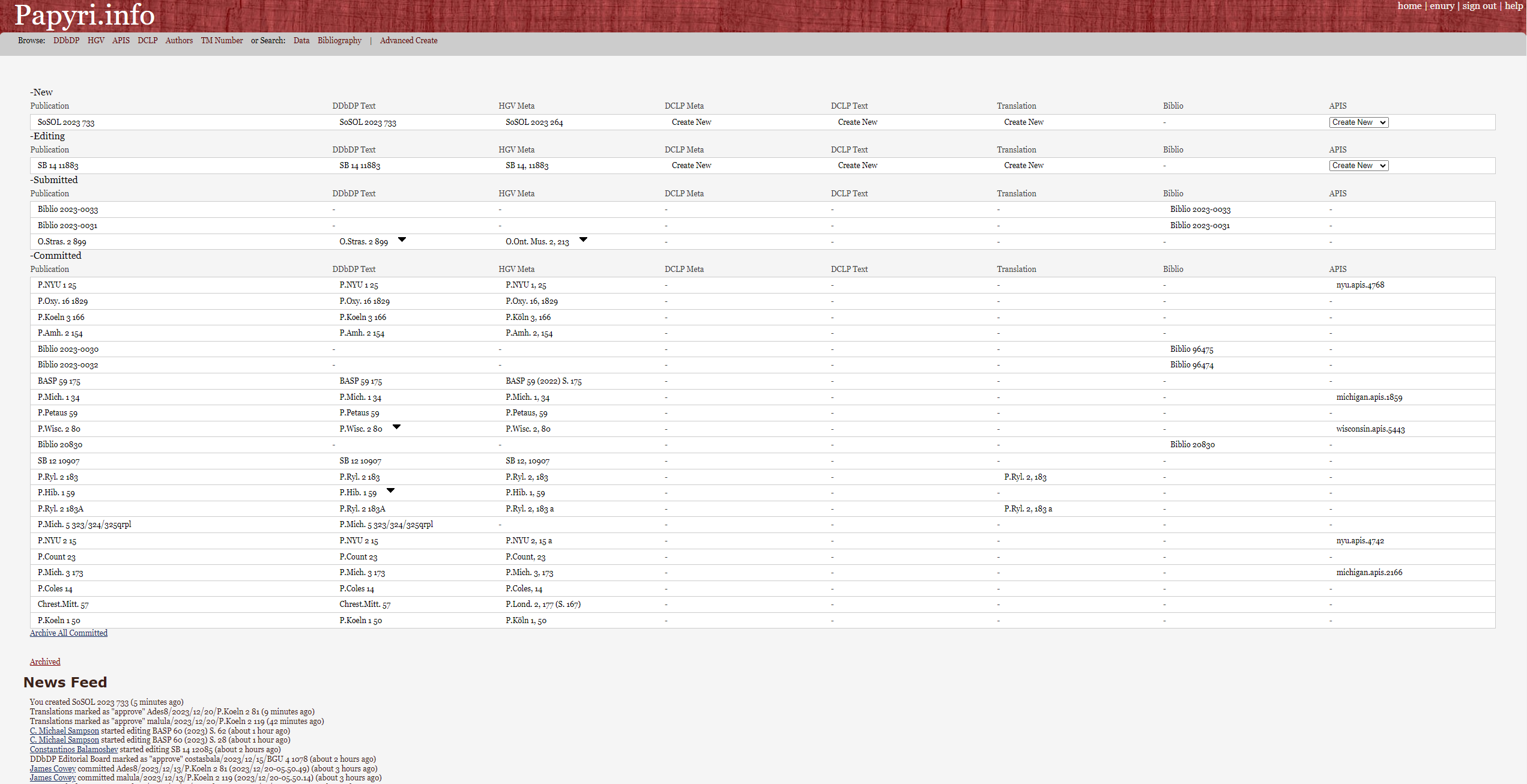
23For each publication, the dashboard presents a row of links allowing access to the various parts of the related data. The first, “Publication”, leads to the overview page (Fig. 6), where it is possible to look at the comments that inform the editorial history of the entry, to delete, submit or withdraw from the editorial review the specific publication, and to download a copy of the XML data composing it. The other links lead to the respective database entry for the same papyrus — DDbDP Text, HGV Meta, DCLP Meta, DCLP Text, Translation, Biblio, and APIS. This specific data structure comes from the original aim to merge data originating from various projects. It informs not only the user dashboard but the entire structure of the Papyri.info website. Each of these corpora can be edited, but most users will focus on Text and Meta entries, so these will be at the core of this review.
24Through the user page, accessible from the top right corner of the home page, one can edit user information and access the usage stats. Users with a Google account can create a password to switch to a username-password account.20 The activity statistics of all users is accessible through the “usage stats by user” link. For each user, it is possible to know whether they are a member of one or more editorial boards and which publications they have submitted, voted upon, or finalized. However, there is no list of the members of the various editorial boards who are allowed to vote upon individual submissions — such information would further increase the transparency of the peer review process.
Creating a Publication
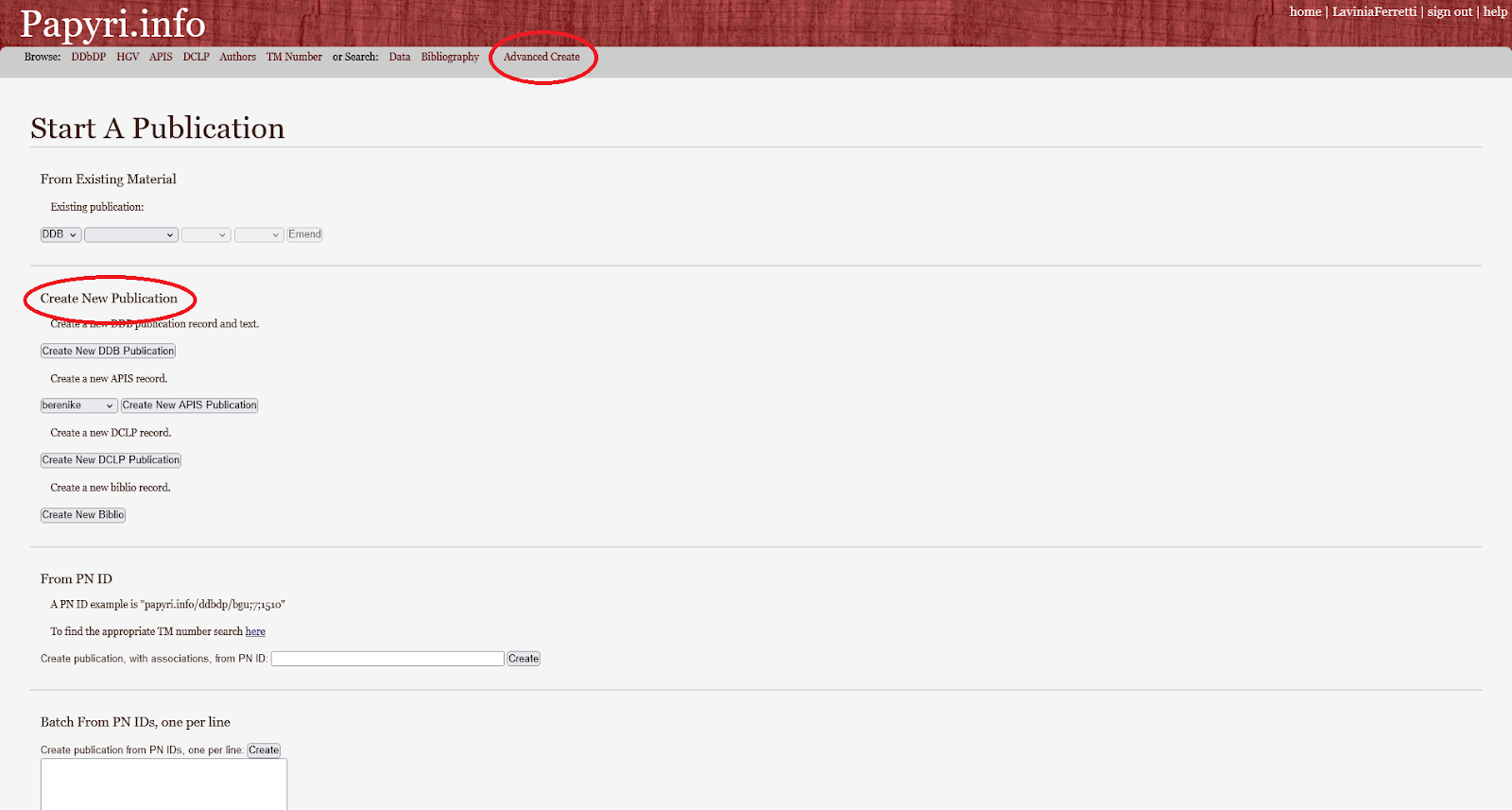
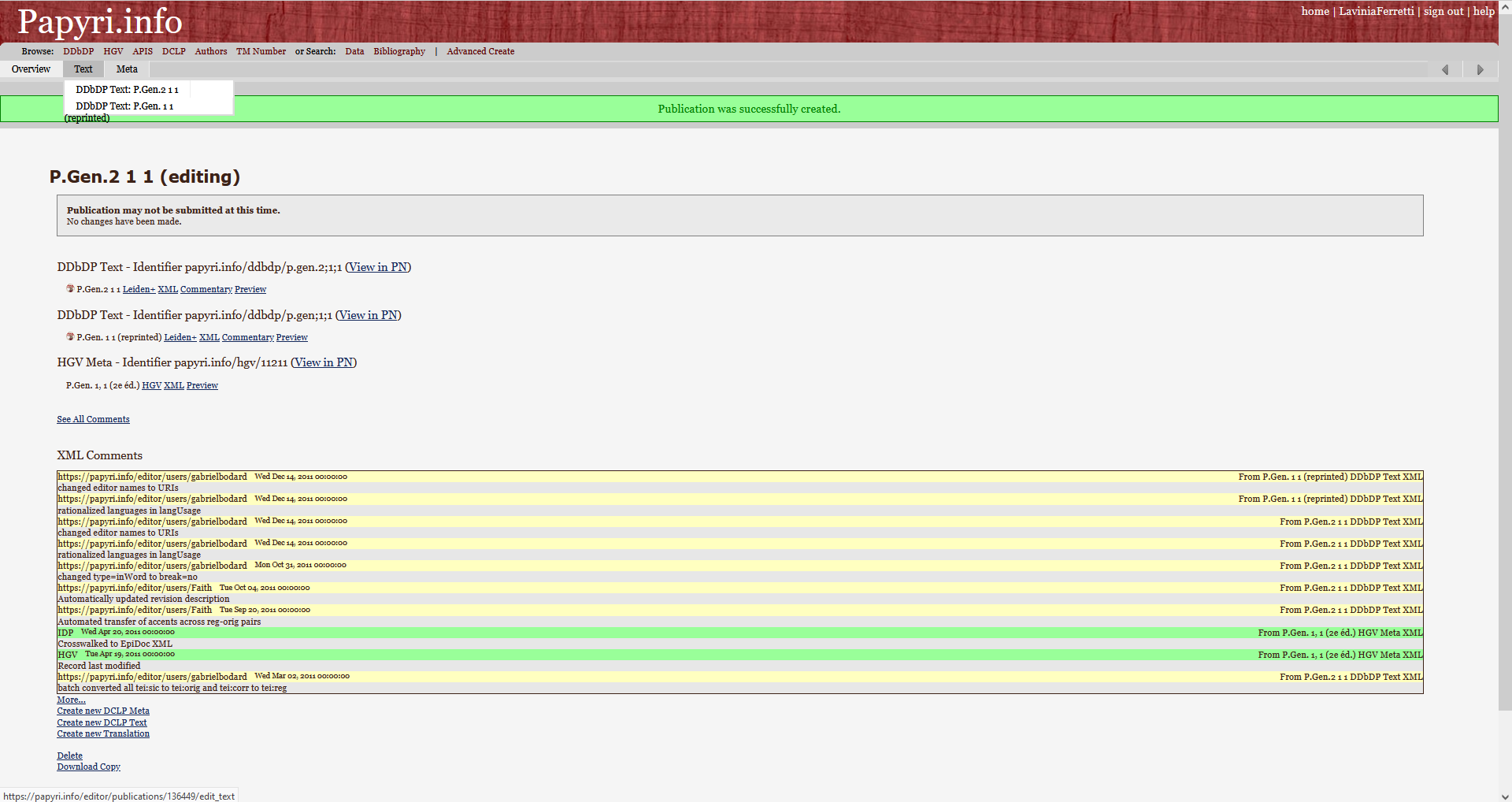
27The overview page also allows users to expand the existing entries to other IDP databases. For instance, it is possible to create a DDbDP textual entry for an existing HGV one or a translation for an existing DCLP or DDbDP. This is possible through the “create new” links at the bottom of the overview page (which is slightly ambiguous as they do not create a new entry, as with the Advanced create button, but an entry crosslinked to the one the user is working on; Fig. 6). At the bottom of the overview page, the user can download a copy or delete the publication; a deletion will only delete the user’s copy of that publication, and not the database entry of existing papyri.
Editing a Publication
28Most of the work will be done in the “Edit” tab of the “Text” and “Meta” tab. The preview option gives the user an approximate idea of the final result and helps check the data before submission. For textual entries, the “Commentary” tab also allows for adding editorial comments to specific lines of text.
Submission and Review of a Publication
30From the overview page, the user is able to submit the completed publication for review to the editorial board, with a comment explaining the proposed modifications and the reasons behind them. This comment will not only be available to the editorial board during the voting phase but also be integrated into the XML entry of the data and retrievable for every future user. It is always possible to delete a publication as long as no editor has voted on it. Afterwards, the user can only wait for the voting and committing process.
31Each submission undergoes editorial scrutiny; the practice of the editorial board requires only one vote to send to finalization or reject proposals related to the maintenance of the database and at least two votes from two different editors for new scholarship. Each editor’s vote is associated with a comment that, in addition to guaranteeing the transparency of the editorial process, functions as a space for discussion among editors and as a source of feedback for users.
Learning Curve
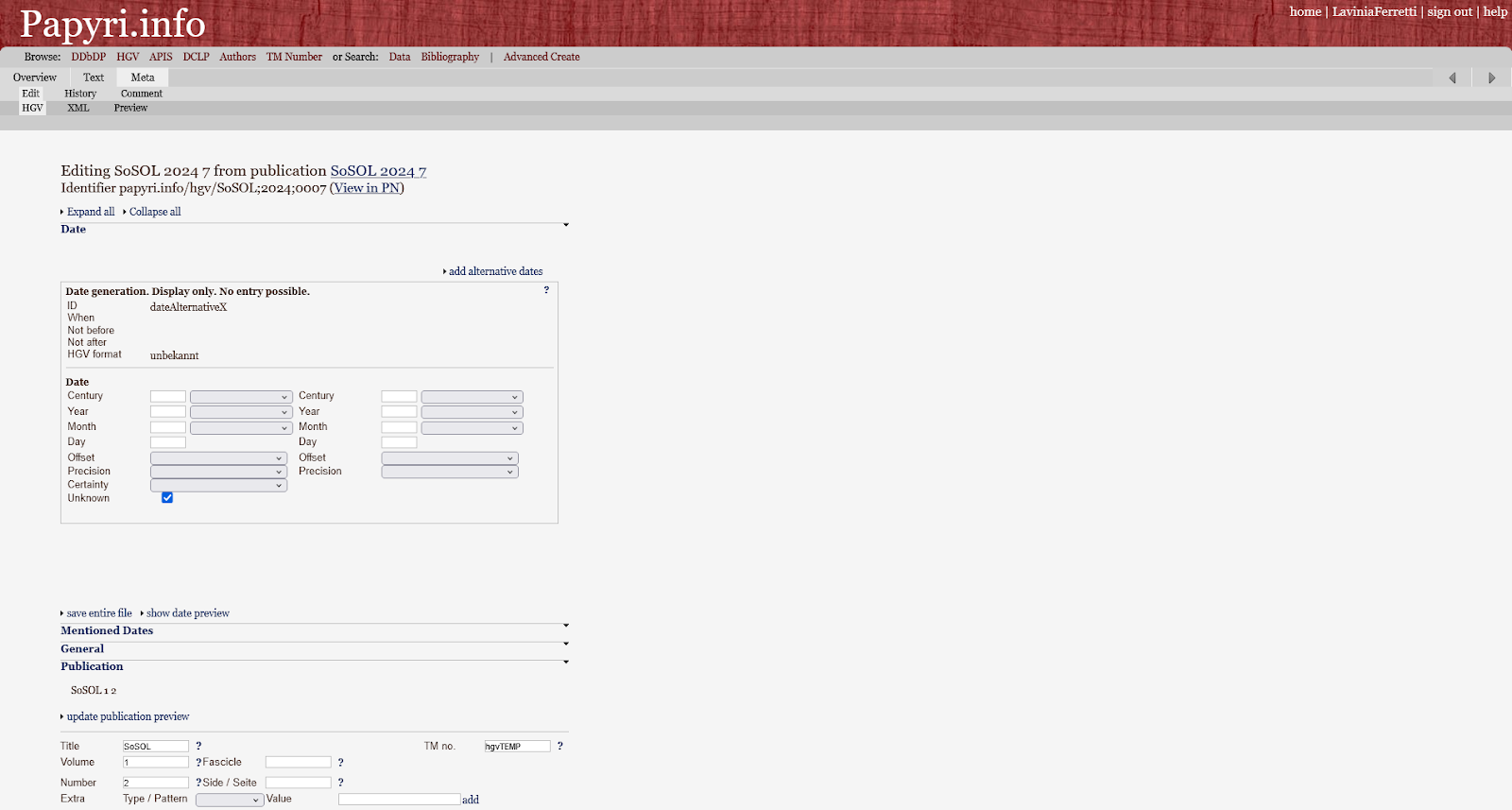
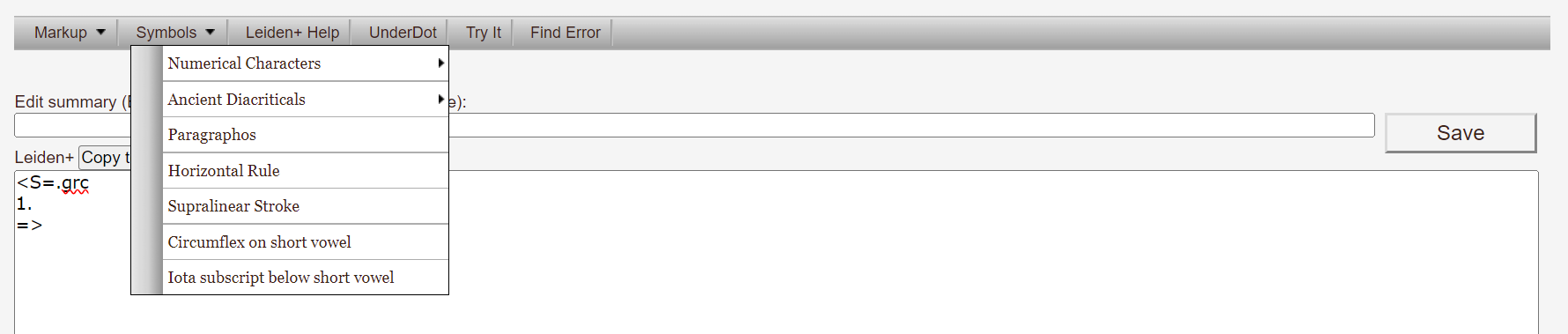
33For the text, however, users have to learn either the Leiden+ language or EpiDoc XML to fully engage with the PE. Papyri.info integrates a help page, accessible all the time on the top right of the website, and provides a menu bar to help users correctly code in the language (Fig. 3).
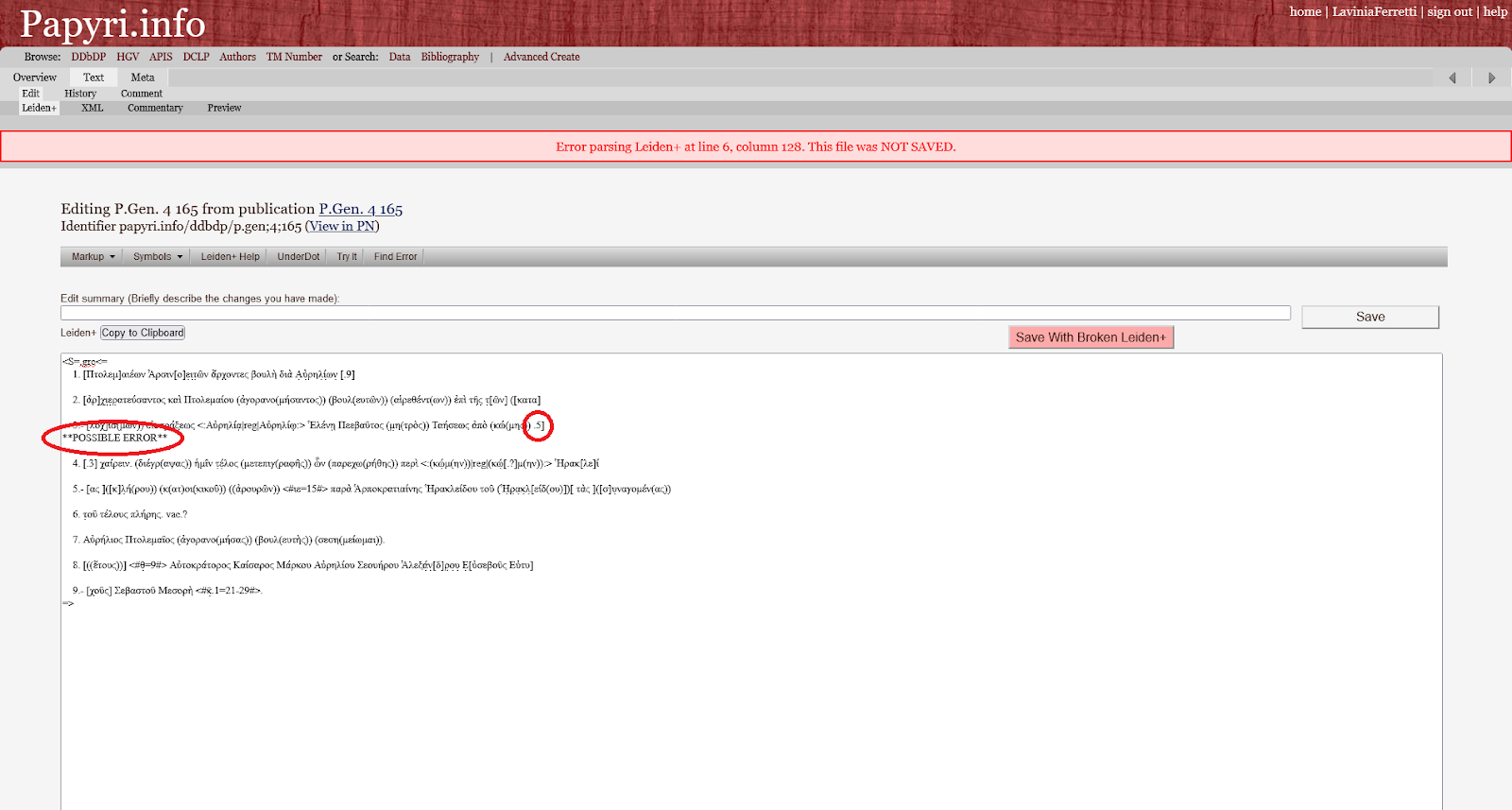
34For textual entries, the Leiden+ help file furnishes reliable information on how to encode the data, and the POSSIBLE ERROR feature of the automated Leiden+ verification indicates where mistakes must be corrected. More generally, the editorial comments give feedback on the quality of the entry. For instance, when users do not know how to enter some data correctly, they can always mention it in their commentary field to leave the editorial board correctly encode the data; conversely, editor comments indicate corrections to be done to the entry that users can read to learn how to improve their future entries.21
35According to some feedback by colleagues, the comments field and Leiden+ help page are insufficient to build confidence in the user. The complex structure of the data and the website, with multiple interrelated databases each accessible through multiple paths, can be overwhelming for newcomers. The overview page, for instance, changes according to the status of the publication (New/Editing/Submitted/Commited). The help page concerns only one part of the system, and the comments arrive late in the process. Moreover, the EpiDoc encoding and the internal practice in the PE may evolve faster than the examples on the help page. This fact increases the difficulty of learning by example.
36Therefore, the creation of online tutorials for beginners on how to approach the website would be much appreciated, and existing tutorials, such as the SunoikisisDC class (Bodard, Vannini, and Vierros 2022), could be better highlighted. FAQ or forum pages, where one could ask specific questions, may be helpful too, although they are resource-consuming. Moreover, some initial training from more knowledgeable users is often necessary. Trainers can introduce users to the syntax of Leiden+ and give hints on how to properly encode text. They can also share some insider knowledge on how to fill the entry forms. A typical learning curve, therefore, is composed of a first introduction to the system through formal training, followed by a phase of trial and error through which familiarity with it develops. It may take some time to fully grasp the system, and some users abandon the PE during the learning phase.
37A special mention should be made of the form used to create a bibliographical entry. It is incredibly complex, to the point that without guidance, the average user cannot learn how to enter the information correctly. Even with training, it is easy to forget where each piece of information should go. Some fields tend to bug, such as the Publisher – Name and Publisher – Place entries, that systematically duplicate the information in the XML. Both reviewers have ended up directly editing the information in the XML file, as this is easier to understand. However, this is a minor criticism, as the addition of bibliographical data does not belong to the usual tasks of PE users and is mostly done by experienced users directly in the GitHub repository.
Rights and Attribution
38The texts of the DDbDP and metadata of HGV are licensed with a CC-BY 3.0 License (Baumann 2013), while APIS records are under a CC-BY-NC 3.0 license. All licenses are clearly visible on each papyrus record and encoded in the DDbDP XML files. The DDbDP/HGV license is also highlighted in the project’s Git, but not the APIS license. However, the licenses appear to be absent from the XML files of the HGV metadata and APIS records. For long-term reuse purposes, it may be useful to include the licenses directly into the XML.
39The editing and voting process is entirely transparent, as every user contribution and every vote from the editorial board must be associated with a comment (Sosin 2010). If the publication is approved and committed, these comments will also be retrievable for every future user. If the publication is refused, the user can see the comments. Still, these are only integrated into the XML files if they resubmit the publication (see Code 1) and will disappear if it is deleted.
<change when="2021-01-12T07:38:39-05:00"

    who="http://papyri.info/users/james.cowey">

        Vote - HGVReject - I am sending this back because

        the link is nowhere to be see. I think that you

        entered the link and then clicked on save. Please

        enter the link, click on the "add" button to the

        right of the box into which you entered the link

        and then click save. <change>
Code Example 1: Example of a comment from the <revisionDesc> of HGV 3399 = UPZ I 8, accessible at https://papyri.info/hgv/3399/source (Accessed January 29, 2024).
41All the comments related to modifications of a file are included in the XML revision description, which thus ensures credit for the work done in the PE. It is accessible by looking at the XML itself, on the PN or the associated GitHub page, or by creating a publication to modify the file and looking at the comment section of the overview page. Comments pertaining to DDbDP and DCLP entries are also accessible at the bottom of the related PN page by clicking “Editorial History” – this option is not available for comments in the HGV metadata.
42In addition, logged users can access the statistics of any other user to see what they have submitted and the changes accepted by the boards. However, such contributions are not traditional research outputs, such as books or articles, and it may still be difficult to cite them in a CV and secure proper recognition when applying for academic positions – a problem that is not specific to the PE but more general to digital scholarship.
43This problem is especially acute for maintenance work; newly published scholarship, be it in the form of editorial corrections of new editions, is at least clearly indicated on the main web page of each entry (e.g., in the form of an apparatus note to the textual edition) and recorded in a specific publication that makes it easier to cite it in CVs, the BOEP.22 This situation directly impacts the system’s sustainability: although many papyrologists are aware of mistakes in the PN data, only a few actively correct them – the lack of recognition for a time-consuming task being a possible reason.
Conclusion
44The Papyrological Editor has undoubtedly reached its primary goal of maintaining and keeping up to date the databases it relies on: over the last ten years, papyri newly published in print books have been thoroughly added to the system, and mistakes in the legacy data could be at least partially curated by the free work of its users. The vetting process guarantees the quality of the entered information and a relative consistency of practices. Although the online data is still not entirely up to date with print scholarship, especially concerning textual corrections and publications in articles, the backlog is no longer increasing and is even reducing. Hence, the data in the papyrological navigator remains an essential starting point for papyrological research.
45The main barrier to updating the online data is the low number of PE users compared to the amount of work required to keep the content up-to-date. Indeed, although virtually all papyrologists rely on the Papyrological Navigator for their work, and they are often aware of errors in the data, only some of them contribute to the Editor; likewise, only a handful of editors actively contribute to voting and finalizing publications, so that some user contributions wait a long time before being integrated to the data. Improving the engagement of PN users in the PE would help the upkeep of the data. Among the improvements that could go in this direction are the integration of better guidelines for the whole editorial process and not simply the Leiden+ syntax, the increase in visibility and crediting for the user and the editorial work, and solving the few bugs that remain in the system. Better visibility of the editor on the website and more precise documentation may help increase the users involvement with the PE.
46The PE in Papyri.info relies on the papyrological community’s knowledge to maintain various databases that benefit the same community. By centralizing access to these various resources and allowing collective editing, it simplifies access to the gathered data and ensures its continuous relevance.
Notes
[1] We work on a firefox browser accessed through a Windows 10 Enterprise OS.
[2] Lavinia Ferretti is a papyrologist and a frequent user of the platform. Her knowledge comes from a training workshop with Prof. Mike Sampson, many discussions around specific publications with Prof. Sampson and Dr. James Cowey, two members of the editorial board, and frequent submission of publications. She contributes the user perspective. Elisa Nury is a DH specialist and a specialist of digital editions. She has worked extensively with the DDbDP and HGV XML data for the grammateus project. She contributes with technical knowledge and experience as a user of the PE. The reviewers are funded by the Swiss National Science Foundation while writing this review (grammateus, SNSF grant n° 212424, PI Paul Schubert, and EGRAPSA, SNSF n° 211682, PI Isabelle Marthot-Santaniello). The authors wish to thank all reviewers for their valuable input to this article. The text of this contribution was finalised in August 2024 and approved in January 2025. On October 2025, Lavinia Ferretti has been promoted editor in the DDbDP and HGV boards.
[3] Currently, Papyri.info has no sustainable funding, as a call for support makes clear.
[4] On the relationship between the latter and Papyri.info, cf. Vannini 2018, §15.
[5] To see how the contents of various databases are combined, see for instance papyrus ZPE 203 (2017) S. 217, which displays HGV, Trismegistos, and APIS metadata, a DDbDP transcription, and HGV translations.
[6] For comments on the differences between Papyri.info and DCLP, see Vannini (2018, §19).
[7] The accepted changes are recorded in the Bulletin of Online Emendations to Papyri (BOEP), available as a downloadable PDF from 2012 to 2021 and integrated with the journal Pylon from 2022 (Ast et al. 2022).
[8] There are only five born-digital editions of papyri and a few reeditions of already published texts.
[9] https://web.archive.org/web/20240709083723/https://papyri.info/editor/all_users_links.
[10] Among the 20 most active users, one finds three times James Cowey and twice Mike Sampson, who together have authored over 55 percent of all the commits. These statistics are obtained with the commands “git shortlog –all –summary” (for all users). The command was run in Git bash with a local copy of the idp.data repository (Accessed June 21, 2024).
[11] See the checklist (accessed August 14, 2024) for the list of volumes published each year. The addition of volumes into the PE is shared among papyrologists (Sosin 2010).
[12] https://web.archive.org/web/20240422020248/https://github.com/papyri/idp.data.
[13] On the Leiden system in general, cf. Dow 1969. On its creation, cf. ‘Essai d’unification des méthodes’ 1932; Wilcken 1932; Collart 1933; ‘XVIIIe Congrès international des Orientalistes’ 1932. On later efforts to improve the system, cf. for instance Krummrey and Panciera 1980; Panciera 1991 for epigraphical texts, and Fournet 2022; Association Internationale de Papyrologues (AIP) 2022 for papyrological texts. The Leiden+ syntax and its relationship with both the Leiden Conventions and EpiDoc encoding is discussed in particular by Ryan Baumann (2013) and Nicola Reggiani (2017).
[14] XSugar is a tool to manage back and forth conversion between an XML syntax and another syntax. The code of the XSugar conversion between Leiden+ and EpiDoc is also available on GitHub.
[15] P.vat.aphrod 5 is such an example with several dotted accented letters, such as ὑ̣ on line 12 of fragment C.
[16] https://leaf-writer.leaf-vre.org/ (Accessed January 25, 2024).
[17] https://www.faircopyeditor.com/ (Accessed January 25, 2024).
[18] The Transcription Editor is available as a standalone web editor or from within the New Testament Virtual Manuscript Room (NTVMR).
[19] The archiving process works well from the dashboard page, where the “archive all committed” button allows users to archive all their committed publications, and the “archived” button to access them. On the contrary, the “Archive” button in the overview page of each committed publication is broken in Firefox as well as Chrome and Edge.
[20] In the case of one of the writers, the process is bugged and it is now impossible to retrieve or modify the password, or to edit the user. Nevertheless, this problem does not impact the day to day usage of the system.
[21] The revisionDesc for the HGV entry 3399 = UPZ I 8 (see Code 1) is a good example of such a learning from feedback process.
[22] See Rodney Ast’s message to the papy-list (Accessed January 30, 2024) for the explanations on how to cite a BOEP publication.
References
Association Internationale de Papyrologues (AIP). 2022. “Guidelines for Editing Papyri.” https://web.archive.org/web/20230304172629/https://aip.ulb.be/PDF/Guidelines_for_editing_papyri.pdf.
Ast, Rodney, Lajos Berkes, James M.S. Cowey, Holger Essler, and Julia Lougovaya. 2022. “Bulletin of Online Emendations to Papyri (BOEP) 10 (November 2, 2022).” Pylon: Editions and Studies of Ancient Texts 2. https://doi.org/10.48631/PYLON.2022.2.92976.
Babeu, Alison. 2011. “‘Rome Wasn’t Digitized in a Day’: Building a Cyberinfrastructure for Digital Classics.” Washington D.C. http://www.clir.org/pubs/abstract/reports/pub150.
Baumann, Ryan. 2013. “The Son of SUDA Online.” In The Digital Classicist 2013, edited by Stuart Dunn and Simon Mahony, 91–106. London: The Institute of Classical Studies. https://www.jstor.org/stable/44216325.
Baumann, Ryan, Gabriel Bodard, Hugh Cayless, Joshua Sosin, and Raffaele Viglianti. 2011. “Integrated Digital Papyrology.” Presented at the DH2011, Stanford. https://web.archive.org/web/20170710154928/http://dh2011abstracts.stanford.edu/xtf/view?docId=tei/ab-193.xml;brand=default.
Berkes, Lajos. 2018. “Perspectives and Challenges in Editing Documentary Papyri Online: A Report on Born-Digital Editions through Papyri.Info.” In Digital Papyrology II, edited by Nicola Reggiani, 75–86. Berlin, Boston: De Gruyter. https://doi.org/10.1515/9783110547450-004.
Bodard, Gabriel, Lucia Vannini, and Marja Vierros. 2022. “Contributing Apparatus Corrections to Papyri.Info.” Presented at the Sunoikisis Digital Classics, November 10. https://web.archive.org/web/20221110151510/https://github.com/SunoikisisDC/SunoikisisDC-2022-2023/wiki/Contributing-Apparatus-corrections-to-Papyri-info.
Borcea, Despina. 2022. “Review of the Papyrological Editor.” The Stoa: A Review for Digital Classics (blog). 5 December 2022. https://web.archive.org/web/20231003011521/https://blog.stoa.org/archives/4163.
Cayless, Hugh. 2019. “Sustaining Linked Ancient World Data.” In Digital Classical Philology, edited by Monica Berti, 35–50. Berlin, Boston: De Gruyter. https://doi.org/10.1515/9783110599572-004.
Collart, Paul. 1933. “Bulletin papyrologique, XII (1932).” Revue des Études Grecques 46 (218): 443–67. https://doi.org/10.3406/reg.1933.7142.
Depauw, Mark, and Tom Gheldof. 2014. “Trismegistos: An Interdisciplinary Platform for Ancient World Texts and Related Information.” In Theory and Practice of Digital Libraries – TPDL 2013 Selected Workshops, edited by Łukasz Bolikowski, Vittore Casarosa, Paula Goodale, Nikos Houssos, Paolo Manghi, and Jochen Schirrwagen, 40–52. Cham: Springer International Publishing. https://doi.org/10.1007/978-3-319-08425-1_5.
Dow, Sterling. 1969. Conventions in Editing: A Suggested Reformulation of the Leiden System. [Durham]: Duke University.
“Essai d’unification des méthodes employées dans les éditions de papyrus.” 1932. Chronique d’Egypte 7: 285–87. https://doi.org/10.1484/J.CDE.2.307092.
Fournet, Jean-Luc. 2022. “Some Thoughts on the Papyrological Edition.” In Proceedings of the 29th International Congress of Papyrology. Lecce, 28 July – 3 August 2019, edited by Mario Capasso, Paola Davoli, and Natascia Pellé, 460–70. Lecce: Centro di Studi Papirologici dell’Università del Salento. https://doi.org/10.1285/i99788883051760p460.
Krummrey, Hans, and Silvio Panciera. 1980. “Criteri di edizione e segni diacritici.” In Miscellanea, 205–15. Tituli 2. Roma: Ed. di storia e letteratura.
Panciera, Silvio. 1991. “Struttura dei supplementi e segni diacritici: dieci anni dopo.” In Supplementa italica 8, 9–21. Roma: Quasar.
Reggiani, Nicola. 2017. Digital Papyrology I: Methods, Tools and Trends. Berlin, Boston: De Gruyter. https://doi.org/10.1515/9783110547474.
Sosin, Joshua. 2010. “Digital Papyrology.” The Stoa Consortium (blog). 26 October 2010. https://web.archive.org/web/20170408110552/http://www.stoa.org/archives/1263.
Vannini, Lucia. 2018. “Review of Papyri.Info.” RIDE – A Review Journal for Digital Editions and Resources 9. https://doi.org/10.18716/RIDE.A.9.4.
Wilcken, Ulrich. 1932. “II. Miszellen. Das Leydener Klammersystem.” Archiv für Papyrusforschung und Verwandte Gebiete 10: 211–12. https://doi.org/10.1515/apf.1932.10.3-4.211.
“XVIIIe Congrès international des Orientalistes, Programme des communications.” 1932. Chronique d’Egypte 7: 127–30. https://doi.org/10.1484/J.CDE.2.307071.
Figures
Fig. 1: The edition of P.Gen. IV 165 according to the Leiden (left) and Leiden+ (right) conventions.
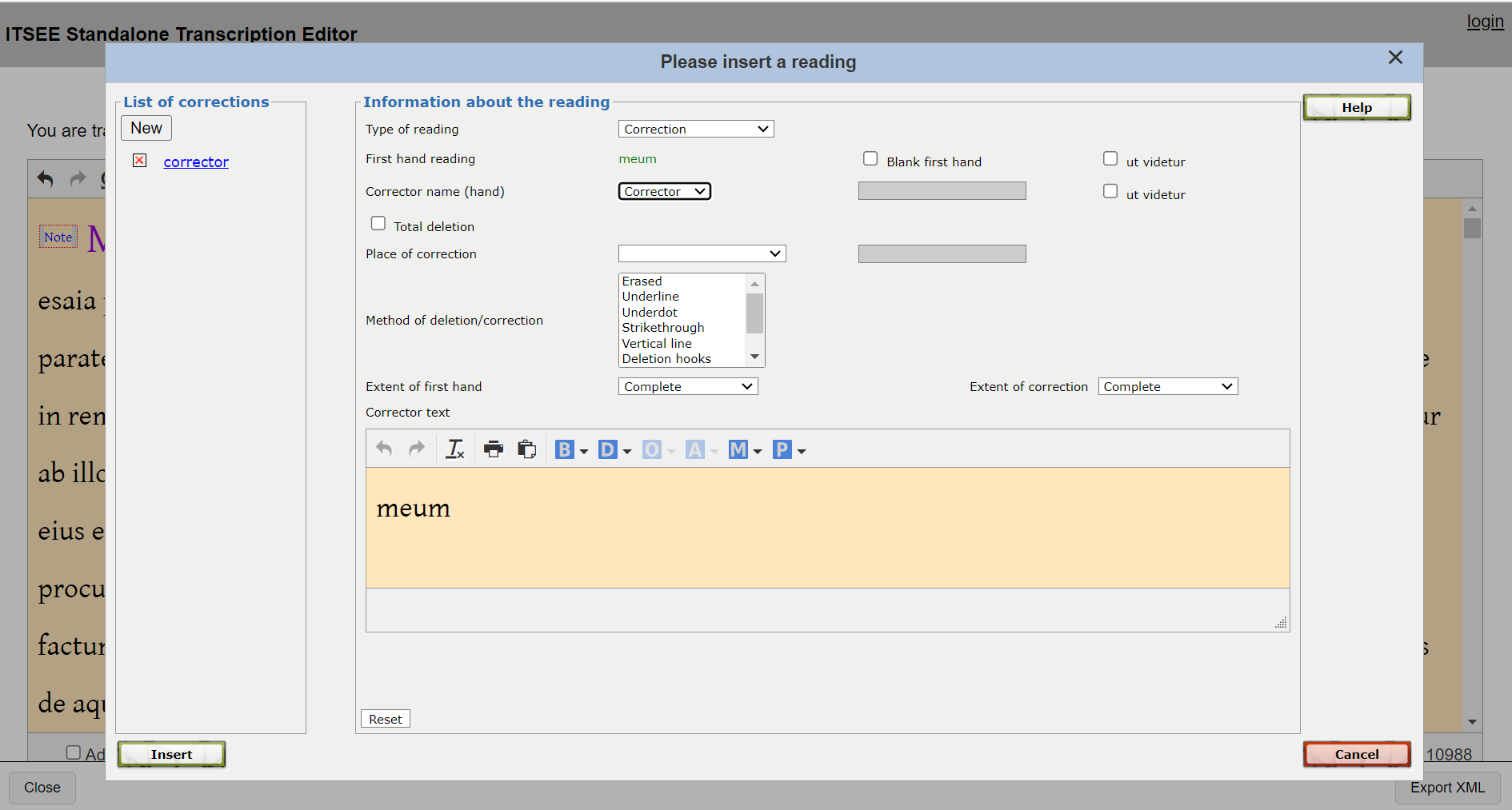
Fig. 2: The Transcription Editor and the “insert a reading” popup window.
Fig. 3: The PE menu bar for adding elements via a popup window.
Fig. 4: The home dashboard of the Papyrological Editor.
Fig. 5: The “advanced create” and the “create new publication”.
Fig. 6: Overview of a publication.
Fig. 7: A wrongly encoded square bracket at the end of line 6 of the document prevents from saving the publication; the “*POSSIBLE ERROR*” indication at the end of l. 3 of the text shows where to look for the mistake.
Fig. 8: The entry form for HGV data.